
We built a HubSpot Agent Hub agent. Here’s what broke, and when we’d use n8n instead.


HubSpot Agent Hub is enough when the decision only needs data already in HubSpot and a rep reviews what the agent produces. We built a “next best action” agent with it in our own portal, on Sales Hub Pro, and it worked. It also broke in five ways nobody warned us about. Here they are, and when we’d build with Claude and n8n instead.
What we built
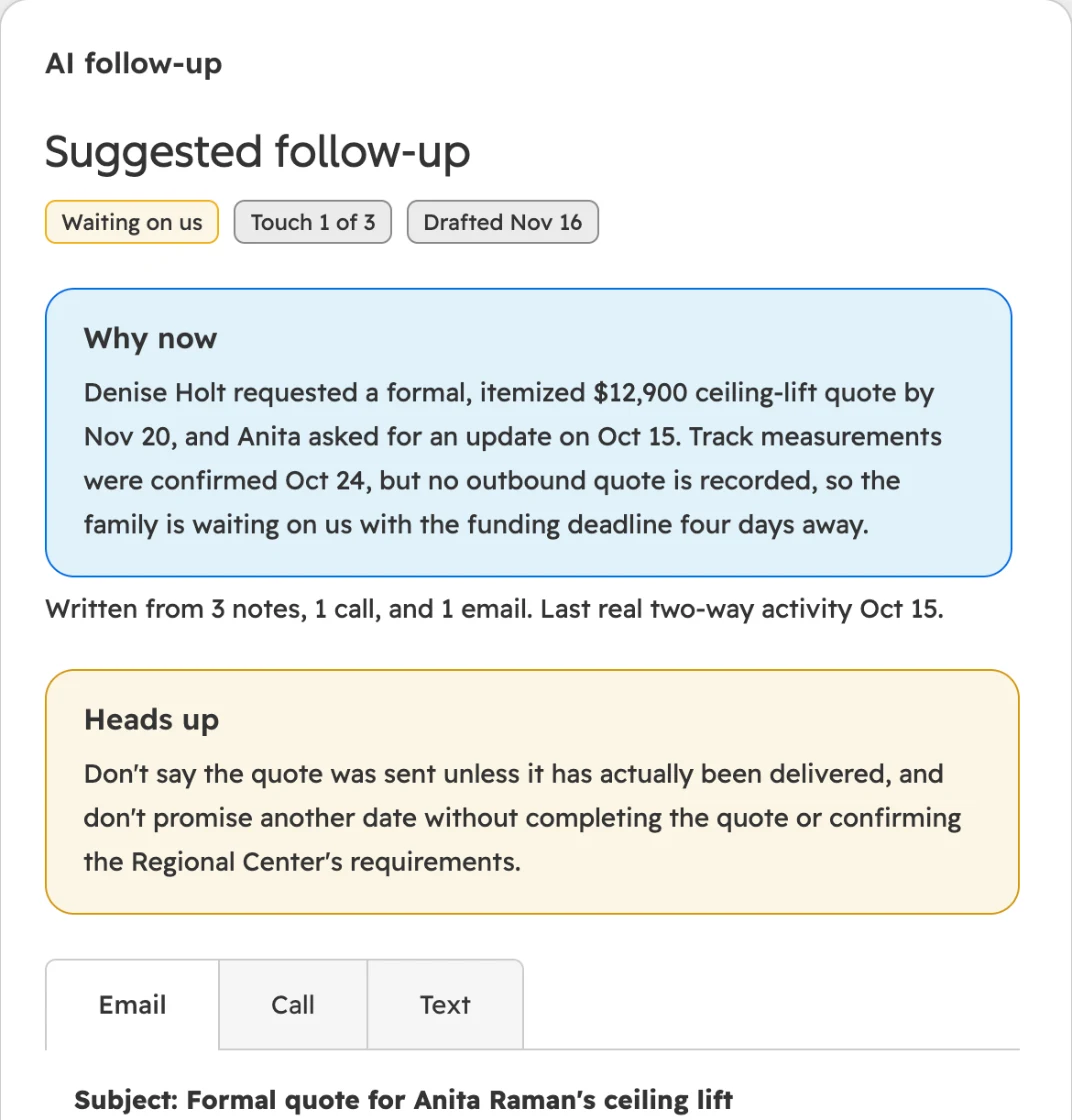
A workflow picks the deals and accounts worth a look, using plain HubSpot rules. The agent reads each record and its history: contacts, company, notes, calls, emails, meetings and tasks. It picks one action (follow up, re-engage, upsell, nurture, close out, or nothing), scores priority from 1 to 5, and drafts an email, a call script and a text. It also names one thing the rep must not say.
Priority 4 or 5 creates a task for the record owner. A custom card on the record shows the reason and the three drafts, so the rep opens the deal and the next step is there. A second agent does the same for companies with no open deal, every Monday morning.
Five things that broke
- It couldn’t see deal history. Agents run as their own “agent user.” By default ours could see every contact, company and deal, but only the notes, calls, emails and meetings it created itself. So it judged deals without their history. The fix: in the agent user’s permissions, set notes, calls, emails and meetings to All.
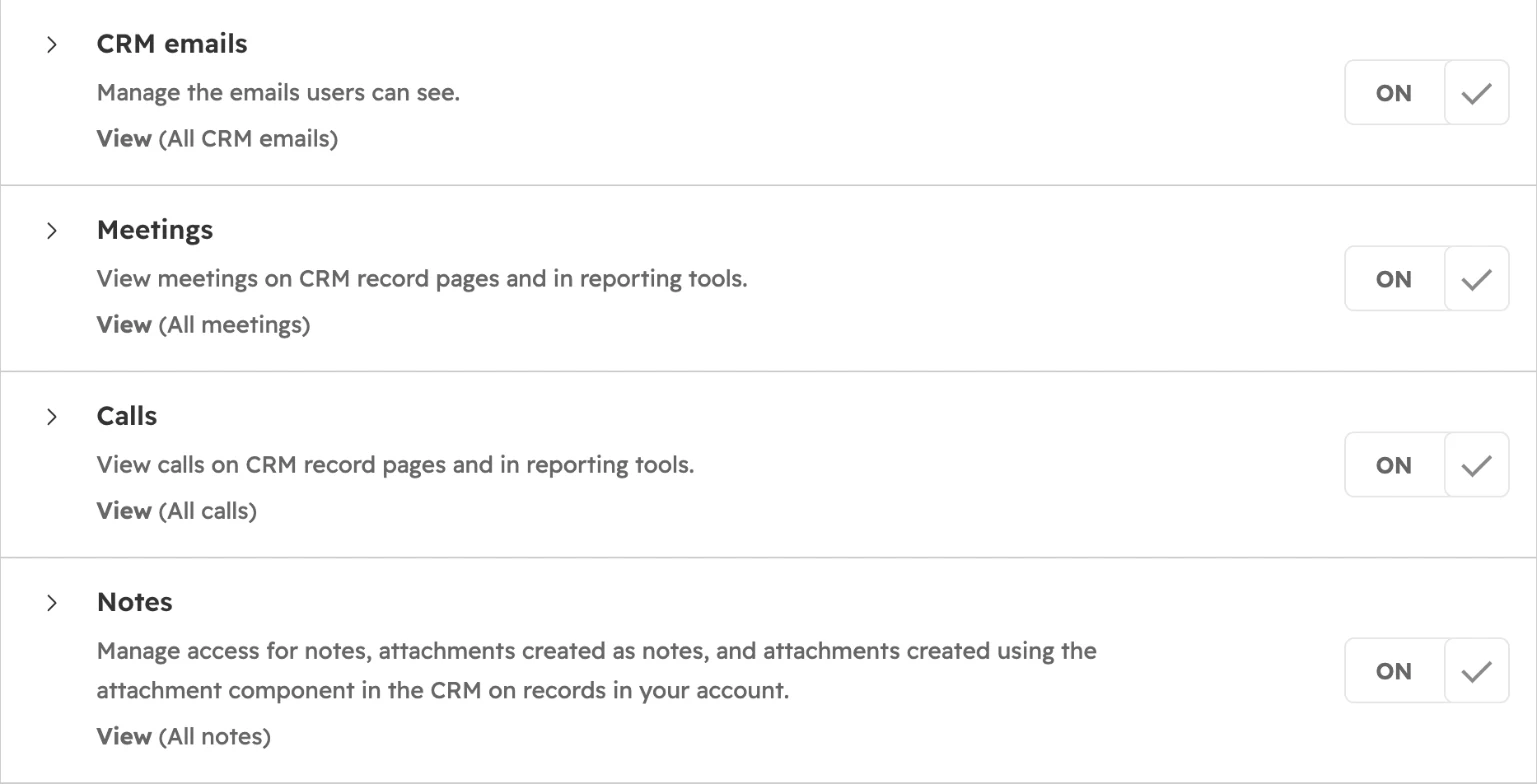
- Super Admin is a one-way door. Once we made an agent user Super Admin, we couldn’t downgrade it. Set the narrow permissions above instead.
- It writes without asking. There’s no approval step on write access. An agent allowed to write to records will write. Ours writes its output to one property, and a workflow decides what happens next.
- Testing eats credits. Simulated tests in the editor are free and write nothing. Draft workflow runs write data and use credits. A deal run used about 57 credits and a company run about 26. One week of testing used 26% of our monthly credits. Draft runs also go one record at a time: the run button greys out until the last one finishes.
- It borrowed our context for a client. Testing on a client’s demo deals, it applied our own ideal customer profile and called them “not a fit for ProfitPad’s services.” Some drafts also referred to the rep in the third person. Both are context problems. Each client needs its own agent with its own context.
The rules that made it trustworthy
The judgment was good: who’s waiting on whom, which deadline matters, what not to promise. These five rules in the instructions set its sense of urgency:
- Priority 5 only when the customer is waiting on us, or a dated deadline is within 14 days.
- When we’re waiting on them, priority caps at 3.
- Never treat your own previous output as fact.
- Never invent prices, discounts or dates.
- If the customer asked something the record doesn’t answer, tell the rep to answer it.
What it did on test deals
Fictional deals, built for a client demo of a company that sells stairlifts.
| Situation | Priority | Action | What it added |
|---|---|---|---|
| Family waiting on our quote for their funding agency, deadline in 4 days | 5 | Follow up | Drafts addressed to the case worker |
| Never got the quote, asked about a Riverside office | 5 | Follow up | “Don’t say there’s a Riverside showroom or promise the October promo until verified.” |
| Waiting on new floors “by mid-November” | 3 | Re-engage | “How did the flooring turn out?” |
| Seven touches, no reply | 2 | Close out | A polite last note |
The last row matters to an owner as much as the first. An agent that tells a rep to stop chasing saves the same time as one that says who to call.
HubSpot Agent Hub vs Claude and n8n
| HubSpot Agent Hub | Claude and n8n | |
|---|---|---|
| Data it can use | What’s in HubSpot | Anything: ERP, inbox, documents, databases |
| Setup | No code, hours | Code and a server, days |
| Who maintains it | Your HubSpot admin edits the instructions | We do |
| Cost | HubSpot credits | AI usage plus your own n8n server, which we host and run |
| Actions outside HubSpot | Limited | Anything with an API |
Start with Agent Hub when the data is in HubSpot, a rep reviews the output, and the volume is a weekly list. Build with Claude and n8n when any of these is true:
- The decision needs data HubSpot doesn’t hold: ERP orders, inventory, pricing, service history.
- It needs deep knowledge, like a full product catalog or past proposals.
- It acts outside HubSpot, or runs at high volume or in real time. HubSpot’s custom code actions stop at 20 seconds, which is why a nightly job of ours across 30,000+ deals runs in n8n.
Either way, keep AI out of the steps that are rules: picking which records to look at, creating the task, sending a text the rep approved. A workflow does those cheaper, the same way every time. The value is the judgment you write into the agent: what counts as urgent, when to stop chasing, what a rep must not promise.
How we connect Claude to HubSpot, and when we hand work to n8n: Using Claude with HubSpot →
FAQ
Can HubSpot agents replace n8n?
Not for work that leaves HubSpot. Agent Hub agents read and write HubSpot records and can browse the web. They only see ERP orders, inventory or service history if that data is already synced into HubSpot, and they aren’t built for high volume in real time. n8n handles those. Used together, n8n feeds the data and the agent makes the call.
How many HubSpot credits does an agent use?
It depends on the job. In our portal, a deal agent run used about 57 credits and a company run about 26. One week of testing used 26% of our monthly credits. Simulated tests in the agent editor are free, so get the output right there before you switch to live workflow runs.
Do HubSpot agents ask for approval before writing to records?
No. In our build, write access had no approval step: an agent allowed to write will write. Limit what it writes in its instructions, have it write to one property of its own, and let a workflow or a rep decide what happens next. Test in the editor’s simulated mode first, since it writes nothing.
Why can’t my HubSpot agent see deal history?
Because of the agent user’s default permissions. Ours could see all contacts, companies and deals, but only the notes, calls, emails and meetings it created. Set those four activity permissions to All on the agent user. Be careful with Super Admin: once we gave it to an agent user, we couldn’t downgrade it.
Thinking about agents for your sales team? We’ll tell you which steps need one and which don’t. Book a free 30-minute review →