
How to set up HubSpot for HIPAA compliance

Yes, HubSpot can be HIPAA compliant. Not out of the box, though: it takes Enterprise, an active BAA, PHI held in sensitive properties, and an object model built for it. And the order you set those up in decides whether it holds.
Most healthcare teams set up HubSpot for HIPAA in the wrong sequence. They turn on Sensitive Data, start marking fields, wire up their integrations, and only later discover that patients and referral partners share a contact object, or that half their PHI is sitting in properties that can't be locked down, or that a report they built quietly pulls protected data into a feature the BAA never covered. Then they rebuild.
The fix is to make the expensive decisions first and the reversible ones last. Here is the sequence we use, and the reasoning behind each step. If you want the companion piece on exactly what the BAA does and doesn't cover, that lives in what a HubSpot BAA doesn't cover. This piece is about how to build it.
This is an operational guide, not legal advice. Confirm your obligations with your own counsel.
Step 0: Confirm the two prerequisites
Before any configuration, two things have to be true.
You need at least one Enterprise hub. Sensitive Data requires it. If you are on Professional or below, there is no setting, workaround, or clever build that gets you to compliance. The conversation is a tier conversation first.
And the BAA has to be signed and switched on. Signing it with HubSpot does not activate anything. Sensitive Data has to be enabled explicitly in the account settings, under Privacy and Consent. Teams routinely assume they are covered because they are on Enterprise and signed the agreement. Verify the setting is actually on before you build a single property on top of it.
Step 1: Decide what is PHI, before you build anything
This is the decision that drives every step after it, so make it first and make it deliberately.
Protected health information is health data tied to an identifier. A name, an email, or a phone number on its own is not PHI. The same name next to a diagnosis, a medication, or a treatment date is. Because the obligation is triggered by the combination, you classify field by field, not by object and not by category. Go through every property you plan to hold and mark it as PHI or not PHI, one at a time.
Do this on paper before you touch HubSpot. The reason is in the next two steps: what you decide here determines your object model and your property design, and both are painful to change after the fact.
Step 2: Get the object model right, because it is the expensive thing to reverse
This is the architecture decision. Everything else is configuration. Confuse the two and you will rebuild.
Keep patients and B2B contacts on separate objects. Patients, and the referral partners, providers, and vendors you deal with, do not belong on the same contact object. They have different lifecycle paths, different data sensitivity, and different lawful bases for processing. The moment they share an object, every property, report, and integration on it inherits the strictest constraint that applies to any record, and you lose access to native features you are paying for, on records that never needed the restriction. This single mistake is the most common and most damaging failure we find in healthcare portals, and it is the one that forces a full rebuild when it is caught late.
Treat HubSpot as the engagement layer, not the medical record. The clinical record itself, the full diagnosis and treatment history, stays in your EHR. HubSpot holds demographics, communication preferences, lifecycle stage, scheduling, referral tracking, and the workflow around care. If clinical data is flowing into HubSpot, the architecture is wrong, and no amount of permissioning fixes it, because permissions govern who sees a field, not whether that field should exist in the CRM at all.
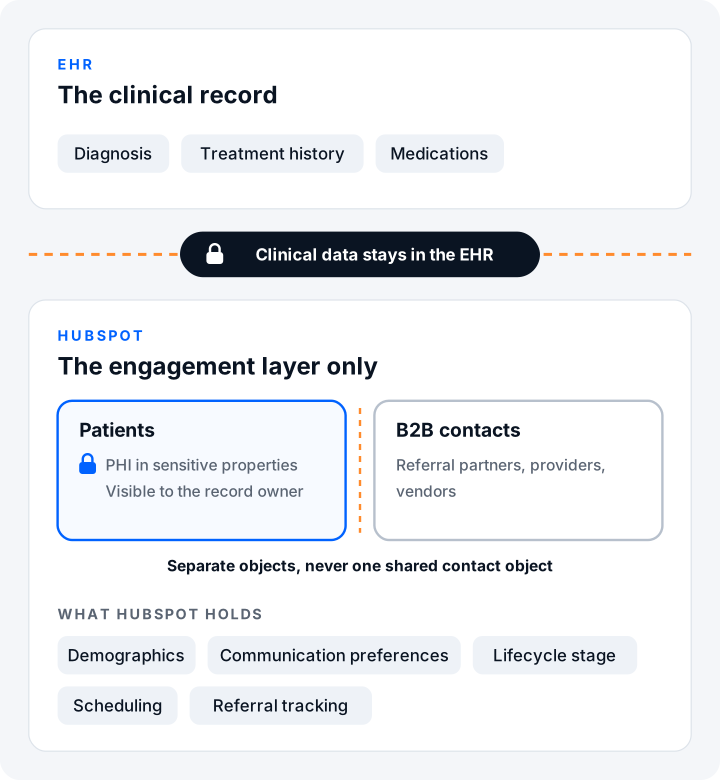
Settle the object model before you create properties. Reversing it later means migrating data across objects and rebuilding everything attached to it.
Step 3: Design properties for sensitivity from the start
Now build the properties, with two rules that catch people out.
Mark PHI properties sensitive at the moment you create them. The sensitivity setting cannot be changed after a property exists. A PHI value sitting in a normal property can't be toggled safe later, it has to be rebuilt as a new sensitive property and migrated. So decide sensitivity at creation, every time. File properties can be marked sensitive too, which matters for anything holding uploaded documents.
Know what marking a property sensitive costs you. A sensitive property is walled off from a set of features on purpose: it can't be used in marketing emails or personalization tokens, it can't be read by Breeze AI, and it can't feed the Custom Report Builder or Customer Journey Reports. That is the correct behavior, but it means you cannot put PHI in a field you were also relying on for marketing, personalization, AI, or those reports. This is exactly why Step 1 comes first: the PHI decision quietly removes those fields from half the platform, and you want to know that before you design a workflow around them, not after. The full coverage detail is in what a HubSpot BAA doesn't cover.
Step 4: Control access by ownership
Compliance is not just encryption, it is restriction. PHI should be visible to the people who need it and no one else.
Restrict sensitive properties to the record owner, so a rep sees PHI for the patients they own and not across the whole database. Access to deals that relate to treatment or medication should be controlled the same way, since a deal itself can constitute sensitive information in a healthcare context. Set these restrictions as you build, not as a cleanup pass, because an open period is an exposure period.
Step 5: Keep PHI on covered paths only
Now the data starts moving, and every path it takes has to be covered.
Inside HubSpot, native activities are covered. Calls, notes, tasks, one-to-one emails, and meetings are covered services, including their body content and attachments, along with call recordings and transcripts. Forms and the meeting scheduler are covered as well. So a rep can log a call, write a note, or attach a document containing PHI, as long as access is scoped to the owner. Coverage is not the same as restriction. You still have to control who can see it.
For automation, stay on covered infrastructure. Native HubSpot workflows are fine. When you need to move PHI outside HubSpot, use self-hosted automation such as n8n, where the data stays inside infrastructure you control. Do not use Zapier or Make for anything touching PHI, because neither holds a BAA that covers it. The native Gmail and Outlook extensions are covered only if your own mail environment is itself under a BAA, so confirm that before you rely on them.
Step 6: Configure AI deliberately
HubSpot's AI features have sharp edges, and the safe path is to decide before you switch anything on.
Breeze can summarize covered call and meeting content, but it does not read custom sensitive properties, so anything you have locked down stays invisible to it. HubSpot's NoteTaker, the assistant that joins meetings to capture notes, is not currently covered, so keep it off meetings that capture PHI until the HIPAA version ships. And the AI features that are not zero-data-retention, including the support bot, should not process PHI at all. Know which features are in bounds before you point any of them at patient records.
Step 7: Validate before you go live
Before the portal handles real patient data, run a pass to confirm the build actually holds. Check that no PHI feeds a report, a marketing email, or a personalization token, that patients and partners are not sharing an object, that every PHI property is marked sensitive and access-scoped, and that no uncovered tool sits anywhere in the data path. Our HubSpot HIPAA readiness self-audit walks through exactly these checks.
If the portal already exists and it's wrong
Most teams aren't starting clean. They already have a portal, and somewhere in it is a shared object or a pile of unclassified PHI. The instinct is to rip out the obvious problem and rebuild. Don't, at least not first.
Remediate in order: property audit, then integration remediation, then re-architecture. Find out which properties actually carry PHI, then find every integration writing it and where, and only then design the corrected structure. Never re-architect first, because you cannot design the target state until you know what you are protecting and what is moving it. Rebuilding on guesses is how a remediation turns into a second remediation.
The short version
Decide what is PHI, architect the object model around it, then configure. The teams that get burned do it in reverse: they configure first, discover the architecture is wrong, and rebuild. The order is the method.
If you want that build done right the first time, or a read on a portal that is already live, that is the work we do. See how we build HubSpot for healthcare teams.
Frequently asked questions
What is the first step to making HubSpot HIPAA compliant?
Confirm you are on at least one Enterprise hub and that Sensitive Data is actually enabled in settings, not just that the BAA is signed. After that, decide what counts as PHI before you build anything, because that decision drives the whole configuration.
Can you make an existing HubSpot portal HIPAA compliant, or do you have to start over?
You can remediate an existing portal. The key is doing it in order: audit which properties carry PHI, then fix the integrations moving it, then re-architect. Re-architecting first, before you know what you are protecting, is what turns one remediation into two.
What is the most common HIPAA setup mistake in HubSpot?
Putting patients and B2B contacts on the same contact object with shared PHI properties. It looks efficient and it forces every record to inherit the strictest constraint, which locks you out of native features and usually means a rebuild once it is caught.
Do you have to keep all patient data out of HubSpot?
No. PHI can live in HubSpot in sensitive properties and covered activities, on Enterprise with the BAA active, as long as access is controlled. What stays out is the clinical record itself, the full diagnosis and treatment history, which belongs in your EHR.