
HubSpot and HIPAA: What you still can’t do with a BAA in place

You signed HubSpot's Business Associate Agreement. You are not compliant yet.
Signing the BAA is the step everyone remembers. It is also the step that fools people into thinking the work is done. It isn't. HubSpot runs a shared-responsibility model, which means the platform gives you the tools and you carry the obligation to configure them correctly. Get that wrong and you are storing protected health information in a system that looks compliant and isn't.
Most articles on this topic stop at "HubSpot is HIPAA compliant now." That sentence is true and it is not useful. The useful question is the one nobody answers: with the BAA signed and Enterprise paid for, what can you still not do? Here is the honest list, drawn from healthcare portals we have built and audited.
For the build sequence, see how to set up HubSpot for HIPAA compliance, or run your portal through the HIPAA readiness self-audit.
The BAA doesn't switch on by itself
Signing with HubSpot does not activate anything. HIPAA settings have to be turned on manually, under Settings, then Privacy and Consent. Until you do that, you have a signed agreement and an unconfigured portal.
We see the same assumption on almost every healthcare engagement: the team is on Enterprise, the BAA is signed, and everyone believes they are covered. Verify it in the settings yourself. Do not take a "yes, we're on Enterprise" as confirmation that the protection is live.
What can't be marked sensitive, and what sensitive data can't reach
Marking a property as Sensitive Data is what encrypts it and restricts it to the record owner. Two constraints come with that, and they shape the whole design.
First, some properties can't be marked sensitive at all. The native identifier fields, first name, last name, email, and phone, can't carry the sensitive setting. That is exactly why the combination rule matters: those fields stay in the open, so the PHI has to live in the fields you can lock down.
Second, once a property is marked sensitive, a set of features can no longer touch it:
- Marketing email and personalization tokens. A sensitive property can't be dropped into a marketing email or merged in through a personalization token. If you were counting on pulling a clinical detail into an email, that path is closed, and it should be.
- Breeze AI. Breeze does not read custom sensitive properties. It can summarize covered call and meeting content, but the values you've locked down stay invisible to it.
- Custom Report Builder and Customer Journey Reports. PHI doesn't belong in these, so a sensitive property can't feed them.
The design consequence is simple: decide what's PHI first, because that decision quietly pulls those fields out of marketing, personalization, AI, and certain reports. Teams that mark properties sensitive after building workflows on top of them end up tearing those workflows apart.
What is covered, so you can stop guessing
The flip side matters just as much, because fear of HIPAA makes teams lock down things that were never at risk and avoid tools they are allowed to use. HubSpot's Sensitive Data coverage, documented in its Trust Center, reaches further than most people assume.
Covered CRM activities include calls, notes, tasks, one-to-one emails, and meetings, and the coverage extends to the body content of each activity and its attachments. A rep can log a call, write a note, or attach a document that contains PHI inside HubSpot, as long as access is controlled. Call recordings and transcripts are covered, and so is conversation intelligence. Form submissions are covered as well, with sensitive values and file uploads restricted to permitted users, and the meeting scheduler is covered too, because a booked meeting creates a covered meeting activity and the booking form runs on the same protected forms infrastructure.
The AI side has sharper edges, and this is where teams get it wrong in both directions. Breeze can summarize covered call and meeting content, but it does not read your custom sensitive properties. HubSpot's NoteTaker, the assistant that joins meetings to capture notes, is not currently covered, though a HIPAA beta is planned. And the AI features that are not zero-data-retention, including the support bot, should not process PHI at all. Know which AI features are in bounds before you point them at patient records.
Enterprise is the floor, not a nice-to-have
HIPAA compliance on HubSpot requires Enterprise. If you are on Pro or below, there is no configuration, no workaround, and no clever build that gets you there. The compliance conversation is a tier conversation first.
That is worth knowing before you scope anything, because it changes the budget conversation entirely. A practice on Professional that wants to store PHI is not looking at a build. It is looking at an upgrade, and then a build.
PHI is a combination, not a field
A common mistake is treating PHI as a category you can tag at the object level. It isn't. A patient's name on its own is not PHI. That same name next to a health condition is. The combination is what creates the obligation, which means every property has to be classified individually.
Under HIPAA's definition of individually identifiable health information, a bare identifier like a name, an email address, or a phone number is not protected on its own. It becomes PHI when it sits alongside health data: a diagnosis, a medication, a treatment date, a date of birth tied to care. This is the definition set out in 45 CFR 160.103. It is widely accepted, and it is still worth confirming your own reading with counsel, because HubSpot experts are not lawyers and the line moves with the data you pair.
Classify field by field. Not by object, not by contact type, not by a blanket rule. The field-by-field pass is tedious and it is the only method that actually holds up, because the risk lives in the pairing of two otherwise ordinary fields.
The mistake that breaks everything: one contact object for patients and partners
Here is the failure we find most often in healthcare portals. Patients and B2B partners, referral sources, vendors, providers you sell to, all sitting on a single shared contact object.
It looks efficient. It quietly poisons the whole instance. Patients and partners have different lifecycle paths, different data sensitivity, and different lawful reasons for processing. The moment they share an object, every property, every report, and every integration inherits the strictest constraint that applies to any record on it. You end up locked out of native features you are paying for, on records that never needed the restriction, because one object is now carrying the compliance weight of its most sensitive contact.
The worst version we have seen: eighty to a hundred PHI-bearing custom properties on one shared contact object, a calling tool writing PHI into both the properties and the activity timeline, and integrations spanning three external systems with no PHI boundary defined anywhere. Every piece of that traces back to the same root error. One object doing two jobs it should never share.
Clinical data belongs in the EHR
The clean architectural line is simple. Clinical data stays in the EHR. HubSpot holds the engagement layer only: demographics, communication preferences, lifecycle stage, appointment scheduling, attribution.
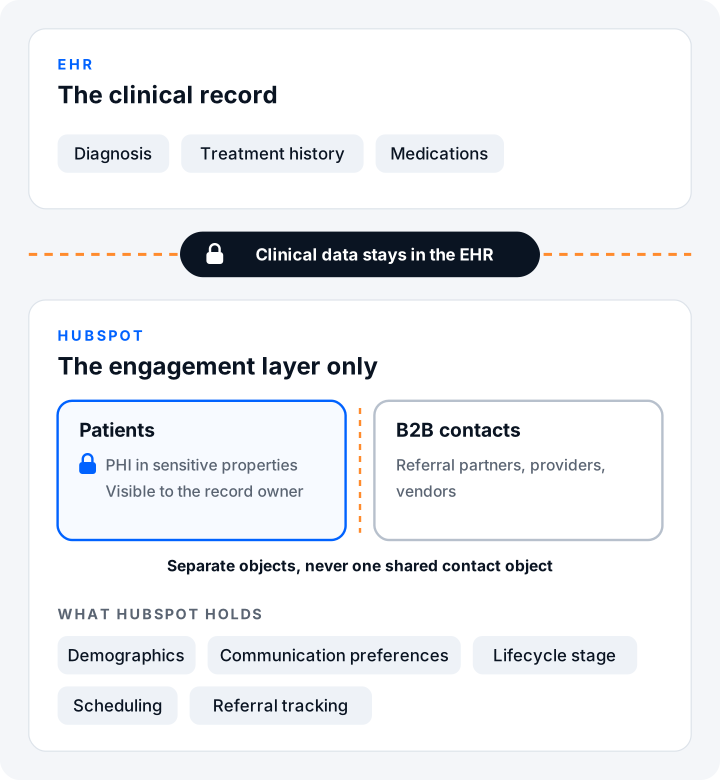
If clinical data is flowing into HubSpot, the architecture is wrong, and no amount of permissioning fixes it. Permissions manage who sees a field. They do not change whether that field should exist in the CRM at all. When the diagnosis and the treatment history live in HubSpot, you have built the problem into the foundation, and you will be re-architecting later at far greater cost than getting the boundary right now.
If it's already wrong, fix it in this order
If you are reading this and recognizing your own portal, the remediation has a sequence, and the sequence matters.
- Property audit first. Find out which properties actually carry PHI and which don't. You cannot design the target state until you know what you are protecting.
- Integration remediation second. Identify every integration writing PHI, and where it is writing it. The calling tool, the form tool, the middleware.
- Re-architecture last. Only once you know what carries PHI and what moves it can you design the corrected structure.
Never re-architect first. It is the instinct, because the shared object is so obviously the villain, but rebuilding before the audit means rebuilding on guesses. Audit, then remediate, then rebuild.
Your automation tools need coverage too, and most don't have it
The compliance boundary doesn't stop at HubSpot. Every tool that touches PHI on the way in or out has to hold up on its own, and the popular no-code automation platforms generally don't.
Zapier and Make route your data through their own cloud, which puts PHI in a system you don't control and isn't covered for it. That rules them out for any workflow carrying protected health information, however convenient they are for everything else. The workable path is self-hosted automation, where the data stays inside infrastructure you control rather than passing through a third party. A self-hosted platform like n8n clears that bar for exactly that reason. The point isn't the specific product. It's the principle: if a tool moves PHI through someone else's servers without covering it, it doesn't belong in the workflow.
A few more that come up
- Consent tracking is a custom object, not a set of properties. If you need to track consent, build it as an object. Properties will not hold the structure over time.
- Contact-to-company association breaks more often in healthcare, because patients use personal email addresses that don't map to a company domain. Plan for retroactive association by import rather than assuming the native logic will catch it.
The short version
HubSpot can be HIPAA compliant. It is not compliant by default, and being on Enterprise with a signed BAA is the start of the work, not the end of it. The compliance lives in the architecture: which object holds which contact, which fields carry PHI, which native features stay off limits, and where the line sits between the CRM and the EHR.
Get that architecture right and HubSpot runs clean for a healthcare team. Get it wrong and you have a compliant-looking portal with PHI in the wrong places, which is the most expensive version of all, because you pay to build it and then pay again to unwind it.
Frequently asked questions
Is HubSpot HIPAA compliant?
Yes, when it is configured correctly. It is not compliant by default. You need at least one Enterprise hub, Sensitive Data enabled, a signed BAA, and PHI properly marked and access-controlled. Out of the box, it is not compliant.
Do you need HubSpot Enterprise for HIPAA?
Yes. Sensitive Data requires at least one Enterprise hub. On Professional or below there is no configuration path to HIPAA compliance.
Does signing HubSpot's BAA make the account HIPAA compliant?
No. The BAA is one step. Sensitive Data still has to be enabled in the account settings, and every PHI property has to be marked sensitive and restricted to the right users. A signed BAA on an unconfigured portal is not protection.
Can you store PHI in HubSpot?
Yes. PHI can live in properties marked as Sensitive Data and in covered CRM activities, as long as access is controlled to the record owner. What matters is that the sensitive data is encrypted and restricted, not that it stays out of HubSpot entirely.
Are names, emails, and phone numbers PHI in HubSpot?
Not on their own. Under HIPAA's definition of individually identifiable health information, an identifier becomes PHI when it is tied to health data such as a diagnosis, medication, or treatment date. This is set out in 45 CFR 160.103, and it is worth confirming your reading with counsel.
Can you use HubSpot's Custom Report Builder with PHI?
No. Custom Report Builder and Customer Journey Reports are not covered for PHI. A property marked sensitive cannot feed them.
Can Breeze AI access sensitive data in HubSpot?
No. Breeze does not read custom sensitive properties. It can summarize covered call and meeting content, but the values you have marked sensitive stay invisible to it.
Can you send PHI through HubSpot marketing emails?
No. Marketing emails and personalization tokens cannot carry PHI, and a sensitive property cannot be used in them. One-to-one emails logged as CRM activities are a different matter and are covered.
Are HubSpot calls, notes, and attachments covered under the BAA?
Yes. Covered CRM activities include calls, notes, tasks, one-to-one emails, and meetings, and the coverage extends to the body content of each activity and its attachments, along with call recordings and transcripts.
Is the HubSpot meeting scheduler HIPAA compliant?
Yes. A booked meeting creates a meeting activity, which is a covered CRM activity, and the booking form runs on HubSpot's standard forms infrastructure, which supports sensitive data collection with encryption. Both halves fall under covered services.
Is HubSpot NoteTaker HIPAA covered?
Not currently. NoteTaker, the assistant that joins meetings to capture notes, is not covered today, though a HIPAA beta is planned. AI features that are not zero-data-retention, including the support bot, should not process PHI.
Can you use Zapier or Make with PHI in HubSpot?
No. Neither holds a BAA that covers PHI, so both are out for any workflow that touches protected health information. A self-hosted platform like n8n, where the data stays inside infrastructure you control, is the workable path.
If you want a second set of eyes on a healthcare portal before it goes live, or a read on one that is already in production, that is work we do. See how we build HubSpot for healthcare teams.